Noteithub LogoNOTEITHUB

Turn GPT chats into to-dos, journals, and reminders

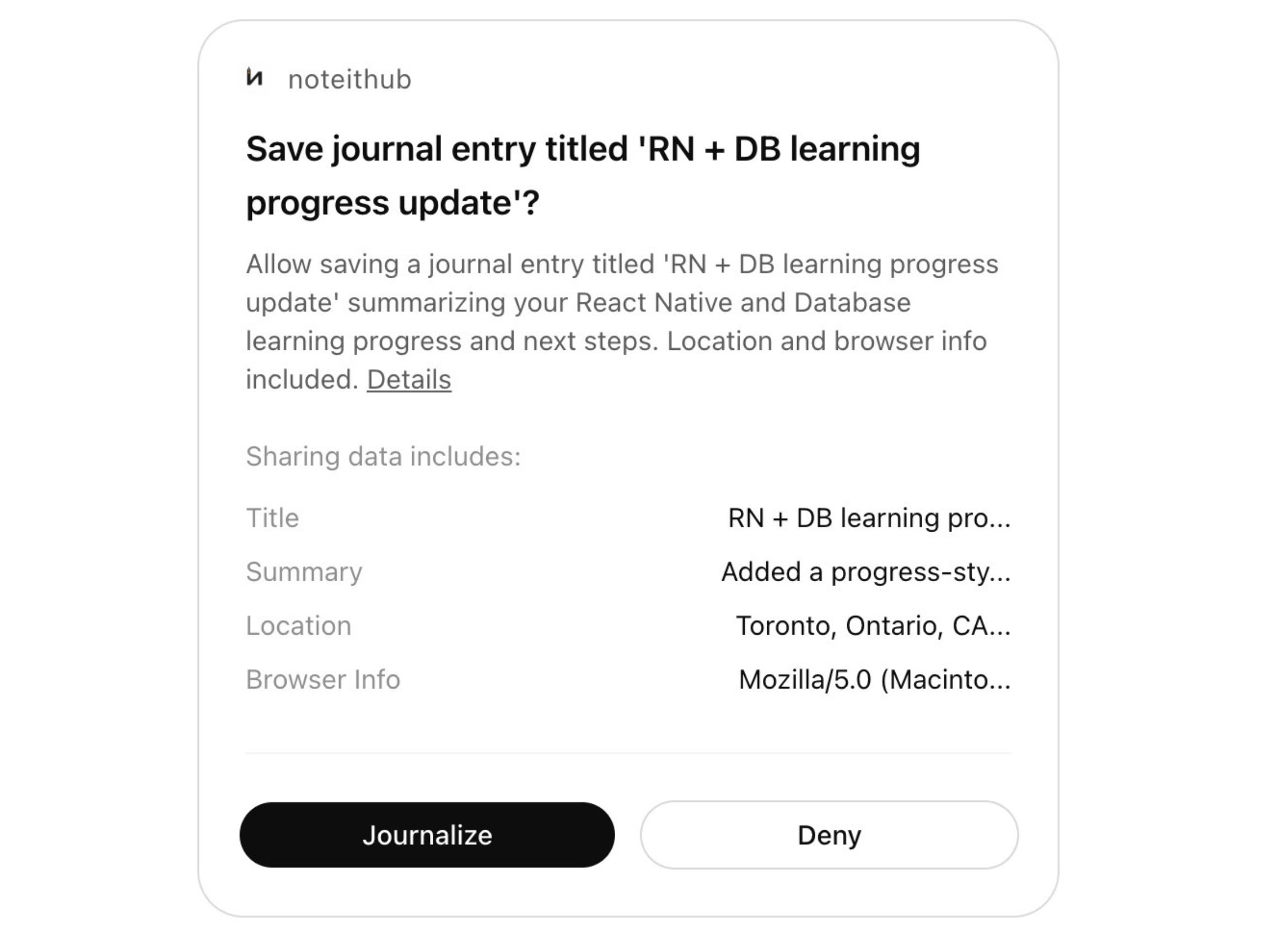
NoteitHub turns your ChatGPT chats into a living workspace—tasks, notes, and reminders you can keep updating. When you return to the same topic later, it appends new items instead of starting from scratch.

How NoteitHub works

  • Open ChatGPT Settings
  • Go to Apps & Coonectors
  • Select NoteitHub from the list and Connect
  • Create a Todos list and start planning
Loading demo…

Demo video showing how NoteitHub summarizes an AI conversation, generates a to-do list, appends new tasks from future chats on the same topic, tracks completion, and syncs tasks to a calendar.

Google Calendar
Google Calendar
Notion
Notion
Slack
Slack
Trello
Trello
Asana
Asana
Jira
Jira
GitHub
GitHub
Google Docs
Google Docs
Gmail
Gmail
Google Calendar
Google Calendar
Notion
Notion
Slack
Slack
Trello
Trello
Asana
Asana
Jira
Jira
GitHub
GitHub
Google Docs
Google Docs
Gmail
Gmail

Stop losing decisions and next steps in ChatGPT history

NoteitHub turns AI conversations into living tasks, notes, and plans so founders can ship faster instead of restarting the same planning chats every week. Built for founders and indie hackers who use ChatGPT daily to think, plan, and execute.

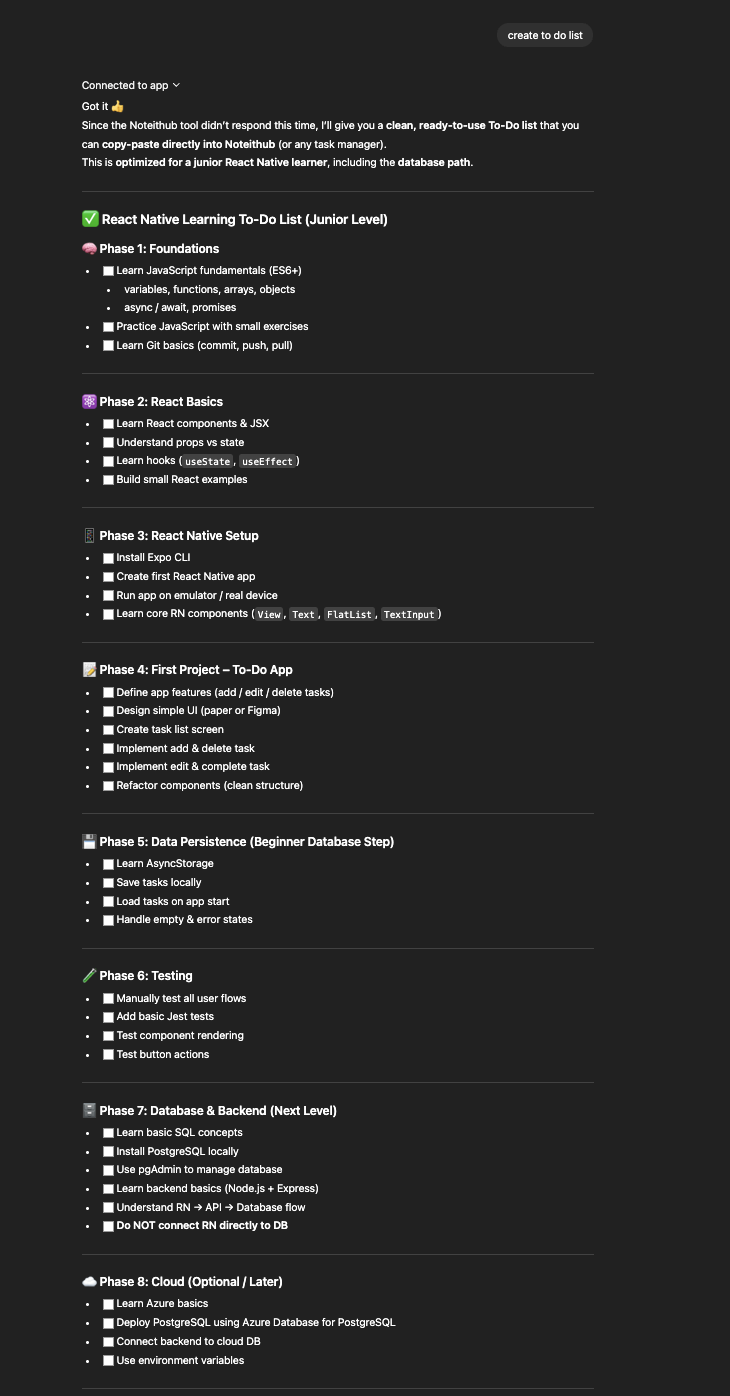
From messy chat threads → clear to-dos with progress.

See how a messy ChatGPT conversation becomes structured to-do cards you can track, reuse, and continue later.

Unstructured to-do list generated by ChatGPT
Transform

Build real progress from your GPT conversations

Turn plans into action with living to-do lists, calendars, and journals.
NoteitHub helps you move forward instead of starting over by tracking tasks, scheduling next steps, and journaling decisions from every AI conversation you save.

AI-generated to-do list with task tracking and progress monitoring

To-Do List

Tasks generated from ChatGPT and updated over time

AI conversation journal with searchable summaries and decisions

Journal

Saved decisions, summaries, and long-term memory

Progress tracking interface showing completed and pending tasks

Trackable Progress

Monitor completed tasks and overall progress

Create you own To-Do Lists and Journals from GPT Chats

The first AI to-do list that remembers your conversations

ChatGPT gives you great plans then forgets them the moment the conversation ends.
Tasks, goals, and decisions get buried in long threads, and the next time you return, you're forced to explain everything again.

NoteitHub turns your AI chats into living to-do lists, trackers, and journals that evolve with you.
Every time you come back to the same topic, your tasks are already there — updated, organized, and ready to continue instead of starting over.

Loading demo…

What Users Say About NoteitHub

Real feedback from people who use AI every day and needed a better way to summarize, save, and find their conversations.

"
starstarstarstarstar

"I use ChatGPT to study, but I kept losing important explanations and plans. NoteitHub turns my chats into clear to-do lists and study notes, so I always know what to review next."

Sara M.

Student

"
starstarstarstarstar

"Most tools stop at generating ideas. NoteitHub actually turns conversations into trackable tasks. I can update the same to-do list over time instead of starting from scratch."

Daniel K.

Software Engineer

"
starstarstarstarstar

"I think out loud with ChatGPT. NoteitHub converts those long strategy chats into structured tasks and calendar plans. It finally bridges thinking and execution."

Nika R.

Founder

"
starstarstarstarstar

"Immigration planning is overwhelming. I use NoteitHub to turn ChatGPT conversations into step-by-step to-do lists and deadlines. It keeps everything organized and stress-free."

Omid A.

Immigration Applicant

Your AI conversations shouldn't disappear they should compound

NoteitHub auto-saves important ChatGPT conversations, summarizes them, and organizes them into a personal journal. When you come back weeks later, everything is still there—organized, searchable, and ready to continue.

Students

AI journaling and to-do lists for students

Students use ChatGPT to understand concepts, prepare for exams, and plan assignments.

But important explanations get buried in long threads.

NoteitHub saves key chats, summarizes them, and organizes them into a study journal you can continue later.

When you come back weeks later, your notes and next steps are still there—ready to use.

AI journaling and to-do lists for students

Students

Founders

ChatGPT memory for founders and startups

Founders use ChatGPT for strategy, product decisions, pricing, and go-to-market planning.

The problem is context disappears across weeks of conversations.

NoteitHub turns those chats into a searchable journal with clear outcomes and next steps.

Instead of starting over, your planning compounds and stays aligned over time.

ChatGPT memory for founders and startups

Founders

Developers

Save debugging sessions and technical decisions from ChatGPT

Developers use ChatGPT to debug errors, design systems, and refactor code.

Those threads contain what you tried, what worked, and why.

NoteitHub saves them as structured notes you can search later.

So you don’t waste hours re-debugging the same issue next month.

Save debugging sessions and technical decisions from ChatGPT

Developers

Marketing

Turn ChatGPT plans into campaigns you can actually execute

Marketers use ChatGPT for content ideas, campaign strategy, and social media planning.

The hard part is turning a plan into consistent execution.

NoteitHub converts your chats into calendars and repeatable workflows.

Your strategy becomes something you can track and ship every week.

Turn ChatGPT plans into campaigns you can actually execute

Marketing

Support & Ops

Build internal knowledge from ChatGPT support conversations

Support teams use ChatGPT to draft replies, troubleshoot issues, and document processes.

But helpful answers are hard to find again when they’re buried in chats.

NoteitHub saves them as templates and searchable journal entries.

Over time, every solved problem becomes reusable team knowledge.

Build internal knowledge from ChatGPT support conversations

Support & Ops

Pricing

Personal

For individual use with basic support.

$4/ 12 tokens per day
  • 30 summaries per day
  • Ad-free experience
  • Email support
Most Popular

Professional

Unlimited summaries and advanced features

$9/ 30 tokens per day
  • Unlimited summaries
  • Advanced search
  • Export & save summaries
  • Custom summary settings

Enterprise

Built for teams that need scale, security, and control.

$11/ 50 tokens per day
  • Multiple team accounts
  • Priority support
  • API access
  • Advanced security

Frequently asked questions

Click a question to open the full guide. A few answers are shown inline when a guide isn’t needed.

How does NoteitHub work with ChatGPT?

How do I turn a ChatGPT conversation into a to-do list?

Can a ChatGPT to-do list update later when I return to the same topic?

How do I save ChatGPT conversations so I can reuse them later?

How do I use NoteitHub as a ChatGPT journal?

How do I turn ChatGPT into a study plan I can track?

How do I manage all my ChatGPT tasks in one place?

How do I add ChatGPT tasks and reminders to my calendar?

How do I turn ChatGPT meeting notes into action items?

How do ChatGPT reminders differ from tasks in NoteitHub?

What happens if I start a new ChatGPT conversation on the same topic?

Is NoteitHub better than a plain ChatGPT to-do list?

Who is NoteitHub for?

How does NoteitHub authentication work inside ChatGPT?

How do I stop losing ChatGPT tasks in chat history?

How do I turn long ChatGPT threads into reusable checklists?

How do I keep one evolving task list per topic in ChatGPT?

How do I create a weekly plan from ChatGPT that I can actually follow?

How do I schedule a study routine from ChatGPT without restarting every week?

How do I convert ChatGPT advice into trackable progress?

How do I turn ChatGPT into a personal accountability system?

How do I turn ChatGPT meeting summaries into follow-ups and deadlines?

How do I create reminders from a ChatGPT conversation?

How do I turn ChatGPT outputs into calendar time blocks?

How do I track what I’ve done vs what’s pending from ChatGPT plans?

How do I save ChatGPT context so I don’t re-explain everything later?

How do I use ChatGPT for journaling without losing entries across chats?

How do I make ChatGPT plans consistent across multiple conversations?

How do I organize ChatGPT tasks by project or topic?

How do I build a workflow where ChatGPT plans don’t disappear?

How do I decide between NoteitHub and a ChatGPT checklist?

NoteitHub - Turn AI Conversations into Trackable To-Do Lists & Journal